Play Classic Chess Online — Free, No Download
About Classic Chess
Play a clean local game of chess in your browser with legal moves, move history, undo, and saved board state.
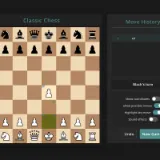
Classic Chess is a focused browser chessboard for two people sharing one device. It handles legal moves, castling, en passant, promotion, check, checkmate, undo, and local browser saves without an account.
Classic Chess sits in our strategy & td games lineup. Tower defense, conquest and tactics.
This supports local play on a shared device. Bring a friend.
Newly added to the catalog — give it a few runs and tell us what you think on Discord.
How to play Classic Chess
Take turns on one device: select or drag a piece, make a legal move, and checkmate the opposing king.
- Choose White and Black players on the same device, then take turns moving one piece.
- Select a piece or drag it to a highlighted legal square.
- Protect your king while creating threats against the opposing king.
- Deliver checkmate to win; use Undo to review a move or start a new game.
Tips for Classic Chess
- Develop knights and bishops before moving the same piece repeatedly.
- Castle early when the path is clear and your king is safe.
- Before every move, check whether an opponent can capture your queen or give check.
- Use the move history to spot the moment a tactical plan changed.

 Classic Chess